You Don't Have a Content Problem. You Have a Feedback Problem.
Most YouTube creators publish consistently and still don't grow. The problem isn't content volume — it's the absence of a structured feedback system.
YouTube Analytics for Creators → How to Track Your YouTube Analytics in Excel → You Don’t Have a Content Problem. You Have a Feedback Problem. (you’re here)
Most creators don’t fail because they ran out of ideas.
They fail because they never learn what works.
You publish. You open YouTube Studio. You decide what to make next… based on how you feel.
That’s not a strategy. That’s a lottery.
Why posting more won’t fix your growth problem
Two creators post every week for six months.
Creator A opens YouTube Studio, feels good or bad about the numbers, and moves on.
Creator B logs the same numbers into a spreadsheet and reviews them monthly.
After six months, Creator B knows exactly which formats drive subscribers, which topics get rewatched, and which thumbnails consistently win on CTR.
Creator A is still guessing.
Without a structured feedback loop, you don’t know:
- Which videos actually convert — not just get views
- Which formats are worth repeating
- What to cut and why
- Why something worked when it did
Six months of publishing with no system, and you’re still in the same place.
Not a talent problem. A feedback problem.
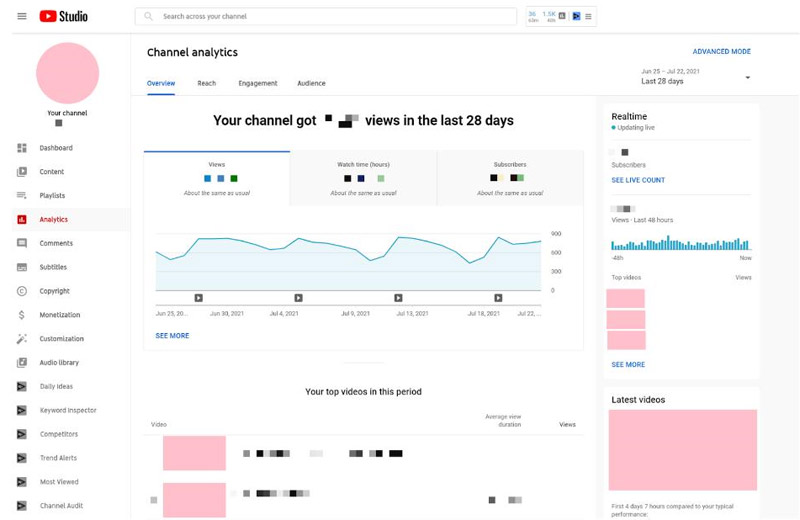
YouTube Studio is a dashboard. Not a decision system.
YouTube already gives you the data.
But data without structure is noise.
| YouTube Studio | A tracker |
|---|---|
| Shows what happened yesterday | Shows patterns over months |
| One video at a time | All videos side-by-side |
| Resets every session | Cumulative, searchable |
| Built for monitoring | Built for deciding |
| No format-level analysis | Surfaces what formats actually work |
YouTube Studio tells you your CTR was 4.2%.
A tracker tells you tutorials consistently outperform vlogs by 2× — and that you should make three more next month.
That’s the gap.
What a feedback system actually looks like
You need four components. That’s it.
A video log. One row per video. Upload date, title, format, CTR, views at 48h, watch time, revenue. The raw material for everything else.
A monthly dashboard. One row per month. Channel-level totals — views, subscribers, watch hours, uploads. Tells you if you’re growing or just staying busy.
A “What Works” analysis. Groups videos by format. Calculates average CTR and watch duration per type. After 20 videos, the patterns stop being opinions. They become undeniable.
A goals system. Where you want to be in 3, 6, and 12 months. Checked monthly. Adjusted when the data tells you to.
Four components. No subscriptions. No complexity.

MINI vs PRO: which tracker fits where you are
Both are built on this system. They’re sized differently.
| MINI ($2.99) | PRO ($19.99) | |
|---|---|---|
| Best for | Creators tracking for the first time | Creators ready to scale with data |
| Setup time | 2 minutes | Under 10 minutes |
| Video log | ✓ | ✓ |
| Core metrics | ✓ | ✓ |
| Top videos auto-ranked | ✓ | ✓ |
| Monthly dashboard | — | ✓ |
| What Works analysis | — | ✓ |
| Goals tracker | — | ✓ |
| Audience & revenue tabs | — | ✓ |
| Total sheets | 4 | 9 |
Start with the MINI if you’ve never tracked before. It takes 2 minutes, covers the core 80%, and costs less than a coffee.
Go PRO when you’re publishing regularly and want the full picture — format analysis, monthly trends, and a real growth system in one place.
The monthly review that makes it stick
A tracker without a review habit is just a spreadsheet.
Once a month — first Monday works well — run through four questions:
- Log last month’s numbers from YouTube Studio into your tracker
- Check What Works — which formats are consistently winning?
- Find the outlier — one video that overperformed or underperformed. Why?
- Set one focus for next month — more tutorials, stronger hooks, shorter intros
Twenty minutes. Once a month.
After six months, your content decisions are backed by actual data — not algorithm anxiety.
A tracker with two months of data is interesting.
A tracker with twelve months of data is a competitive advantage.
Stop guessing. Start deciding.
Publishing without a system is expensive.
Not in money. In time.
Every video you make without structured feedback is a guess. Some guesses land. Most don’t.
The creators who grow consistently aren’t more creative. They’re more systematic.
Start with the YouTube Analytics Tracker MINI — the simplest way to stop flying blind.
Or jump straight into the full growth system and build the complete feedback loop from day one.
Either way, stop guessing.
People also ask
Why aren’t my YouTube videos getting views even when I post consistently?
Consistency is necessary but not sufficient. If you’re posting consistently without reviewing your data, you’re repeating the same mistakes at higher volume. A structured feedback system — even a simple spreadsheet — surfaces which formats, topics, and thumbnails actually work. The YouTube Analytics Tracker MINI is the fastest way to put that system in place.
What’s the difference between YouTube Studio and a YouTube analytics tracker?
YouTube Studio is a monitoring dashboard built for real-time visibility. A tracker is a decision system built for pattern recognition. Studio shows you what happened. A tracker shows you what it means — across formats, over time, against your growth goals. The YouTube Analytics Tracker PRO adds the analysis layer that Studio doesn’t have.
How many videos do I need before I can spot patterns?
Around 15–20 videos gives you enough data for meaningful format-level patterns. With fewer videos, outliers skew everything. With 20+, the What Works analysis shows clearly which formats and topics perform above your channel average — and which ones to cut.
Is a spreadsheet better than paid YouTube analytics tools?
For most independent creators, yes. Paid tools give you more dashboards but not necessarily more clarity. A well-structured spreadsheet gives you exactly what you need, with full control over your data and no monthly subscription. The YouTube Analytics Tracker MINI is $2.99 once and replaces what most paid tools offer for creators under 100k subscribers.
How do I know which YouTube format to double down on?
Track your videos by format — tutorial, vlog, short, review — and calculate average CTR and watch duration per category. After 20+ uploads, the pattern becomes clear. The format with consistently higher CTR and retention is the one to scale. The What Works analysis in the PRO tracker does this automatically.
Why do some YouTube channels grow faster with fewer videos?
Because they have better feedback loops. Fewer videos, reviewed systematically, produce better decisions per upload than more videos made by feel. A channel that reviews data monthly improves faster than one that just publishes more. The system matters more than the volume.
From this article
Content Creators
YouTube Analytics Tracker PRO
A data-driven system to analyze your videos, identify patterns, and grow your YouTube channel faster — not another tracker.